Norsk

A plumber switches website provider on a Friday. The new site is nicer than the old one, and everything seems to work. By Monday, not a single email has arrived.
The website was never the problem. The email sat with the old provider, on the same domain, and nobody had given it a thought.
That's the typical pattern. Moving the website itself is the easy part. What goes wrong is the domain, the email and the addresses Google has learnt.
The website, the domain and the email are three things
It's easy to think of them as one package, because you often bought them from the same provider. But each one works on its own:
- The website is the pages and the place they live.
- The domain is the name, for example
rorleggerpedersen.no. It's registered to an owner and managed by a registrar. - The email is a service that uses the domain. It can sit with your web host, with Microsoft, with Google or somewhere else entirely.
That means you almost never need to move the domain to move the website. You change where the domain points for the website, and leave the rest alone.
Check who owns the domain
Before you do anything else, find out who the domain is registered to. Norid, which runs .no, calls this the holder, and it isn't always you. Some providers register their customers' domains in their own name, and then the domain is, in practice, theirs.
Look the domain up in Norid's domain lookup. If it's registered to an organisation, you'll see the name and organisation number, and which registrar manages it. If your business is the holder, all is well. If the provider is listed, the domain has to be transferred to you, and both the provider and you must approve the transfer.
If you also want to change registrar, you need a transfer code from the one you have today, or a one-time code that the new registrar orders and that is sent to the email address on the subscription. The registrar can't charge you for the transfer code, and Norid explains how the switch works. But remember: to move the website, you don't need to move the domain at all.
Find out where your email lives
Email is controlled by DNS records of its own, called MX records. As long as you don't change them, your email keeps working when the website moves.
The danger comes in two cases. The first is when your email sits with the old provider and you cancel the whole agreement. Then the email disappears along with the website. The second is when someone moves the whole DNS set-up somewhere new and forgets to bring the MX records.
With Dig in the Google Admin Toolbox, a free tool from Google, you can check where your email lives. Enter the domain and choose MX. If the answer says outlook.com or google.com, your email is with Microsoft or Google and won't be affected. If it names the old provider, you need a plan for your email before you cancel.
Read the contract before you cancel
Three things are worth finding out before you send the cancellation:
- The commitment and notice period. Check whether the agreement renews automatically, too.
- Who owns the text and photos. If the provider took the photos or bought them in, you may not be allowed to keep using them.
- What you get to take with you. Ask for an export of text, photos and form submissions while you still have access.
And wait to cancel until the new site is live. Not the other way round.
Look after the old addresses
Google has learnt the addresses of your old pages, and so have your customers, in bookmarks, in emails and in links from other websites. When an address suddenly says 'page not found', you lose both the visitors and your place in the search results.
The fix is a permanent redirect, also called a 301, from every old address to the page that replaces it:
| Old address | New address |
|---|---|
/services/bathrooms.html |
/bathrooms |
/about-us.php |
/about-us |
/contact-us |
/contact |
Google recommends permanent redirects such as 301 or 308. They should stay in place for as long as possible, generally for at least a year. Update the links on the new site too, so they point straight to the new addresses, and submit the new sitemap in Search Console.
Expect your rankings to wobble a little in the first weeks. According to Google, it can take a few weeks before a medium-sized site has its new addresses shown instead of the old ones. That's normal, and it settles over time.
If you keep the domain and only change provider, you don't need the Change of Address tool in Search Console. That's only for when the domain itself changes.
The move, in the right order
- Finish the new site at a temporary address before you touch the domain.
- Set up the redirects from every old address that matters.
- Change the website's records wherever the domain's DNS is managed. Don't touch the MX records.
- Wait for the certificate. Once the domain points the right way, the site gets an SSL certificate automatically.
- Tell Google. Add the new site to Search Console, submit the sitemap and keep an eye on pages that aren't found in the first weeks. The checklist for being found on Google covers the rest.
- Cancel the old agreement once everything works and the email has a plan.
How Sitekit does it
With Standard you can move the website you have today. You paste in the old site's address and confirm that you own the content.
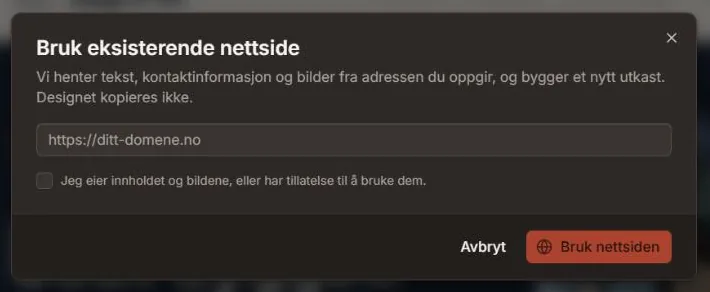
Then we fetch the text, contact details, images, favicon and your brand colours, and the AI builds a new site from them. We don't bring the old site's design with us. You get a new theme.
We fetch up to 20 pages and 30 images. We skip pages for logging in, the basket and checkout, and the old addresses send visitors on to the new pages automatically. The move is an AI job and uses AI credits. You'll find the redirects under Settings, where you can add more yourself.

The site first lives at an address under sitekit-sites.no. When you're happy with it, you connect your domain. You add one record that shows the domain is yours, and one that points the website here. The SSL certificate arrives by itself.
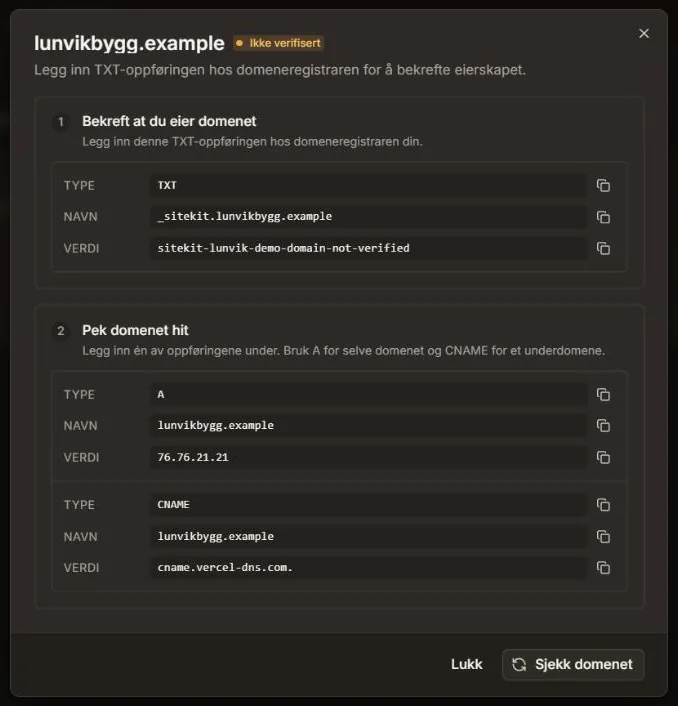
We don't touch your email. There's more on that in the overview of domains and hosting.
One honest limitation: if you have an online shop, Sitekit is not the right place to move it to. We have no payments or basket.
Many people change provider because every little change has turned into an invoice. We've written about what a website costs over three years, and that's often where the sums turn. If you don't have a website to move yet, you can make a free website that looks professional and connect your domain when you move to Standard.
The new site is rarely the most expensive part of switching provider. The most expensive part is the email that vanished on a Monday, and the addresses that stopped working without anyone noticing.